
My Homelab: The Infrastructure Behind What I Build
What started as Home Assistant on an old spare laptop is now a 12U rack — a three-node Proxmox cluster, TrueNAS shared storage, and a UniFi network segmented by design. This is the map of what I run at home, and the starting point for most of what I write here.
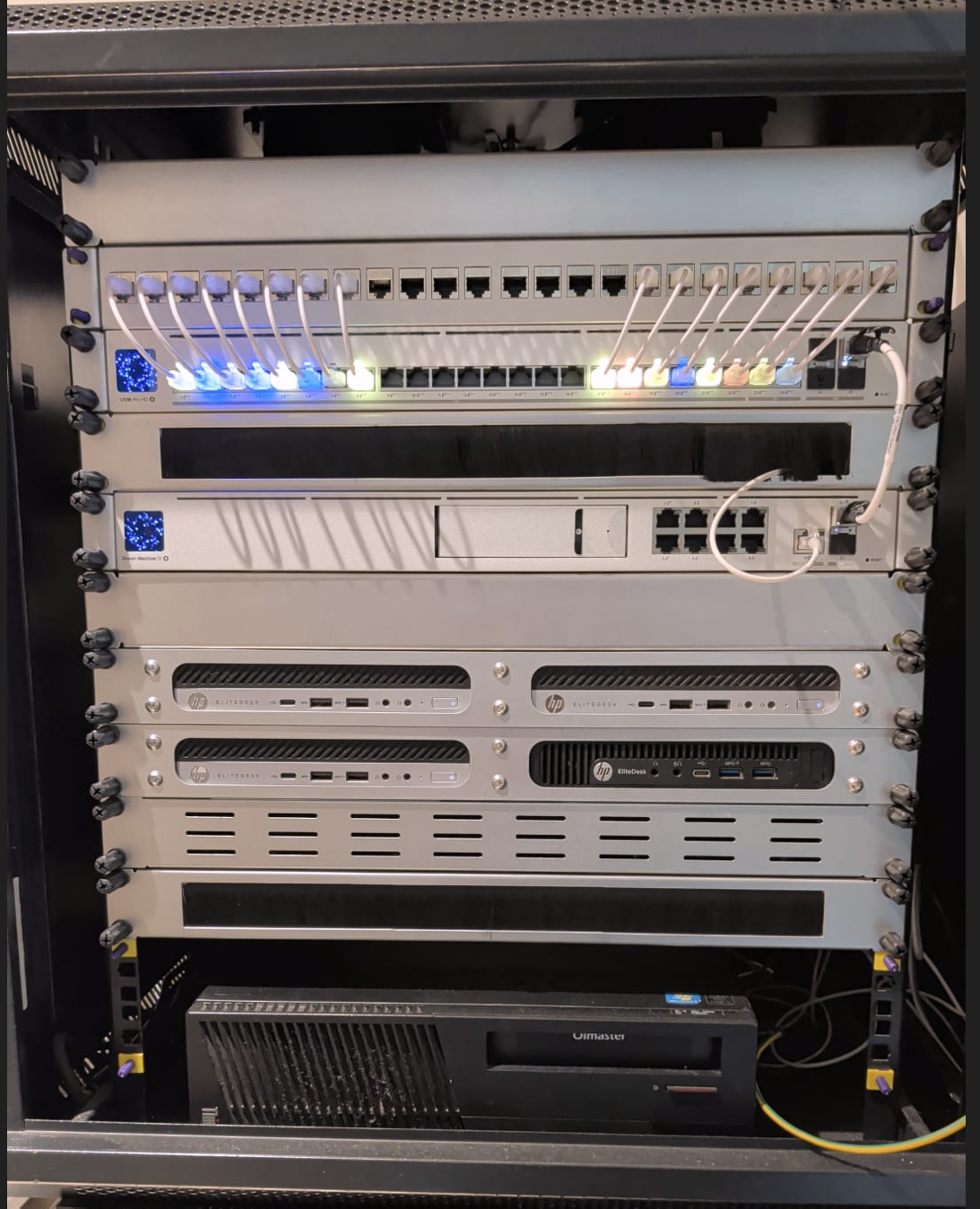
What started as Home Assistant running on an old laptop gradually evolved into a three-node Proxmox cluster, shared TrueNAS storage, segmented networking, and the infrastructure behind many of the things I build and experiment with.
It started with an old laptop
My homelab did not start with a rack, a Proxmox cluster, or a carefully designed network. It started with an old spare laptop running Home Assistant.
At the time, I simply wanted somewhere to run home automation. As more devices were added around the house, that single Home Assistant installation gradually became the centre of a much larger environment — Zigbee devices came next, then MQTT, sensors, cameras, DNS services, media services and other self-hosted applications.
Eventually, the old laptop stopped being the right platform. I wanted something that was easier to maintain, gave me room to experiment, separated workloads properly, and could keep growing without a redesign every time I wanted to run another service. That is what became the homelab I run today.
The rack today
The core of the environment now lives in a 12U rack. At the top is the network stack: a UniFi Dream Machine Special Edition and a UniFi USW Pro HD 24 PoE switch.
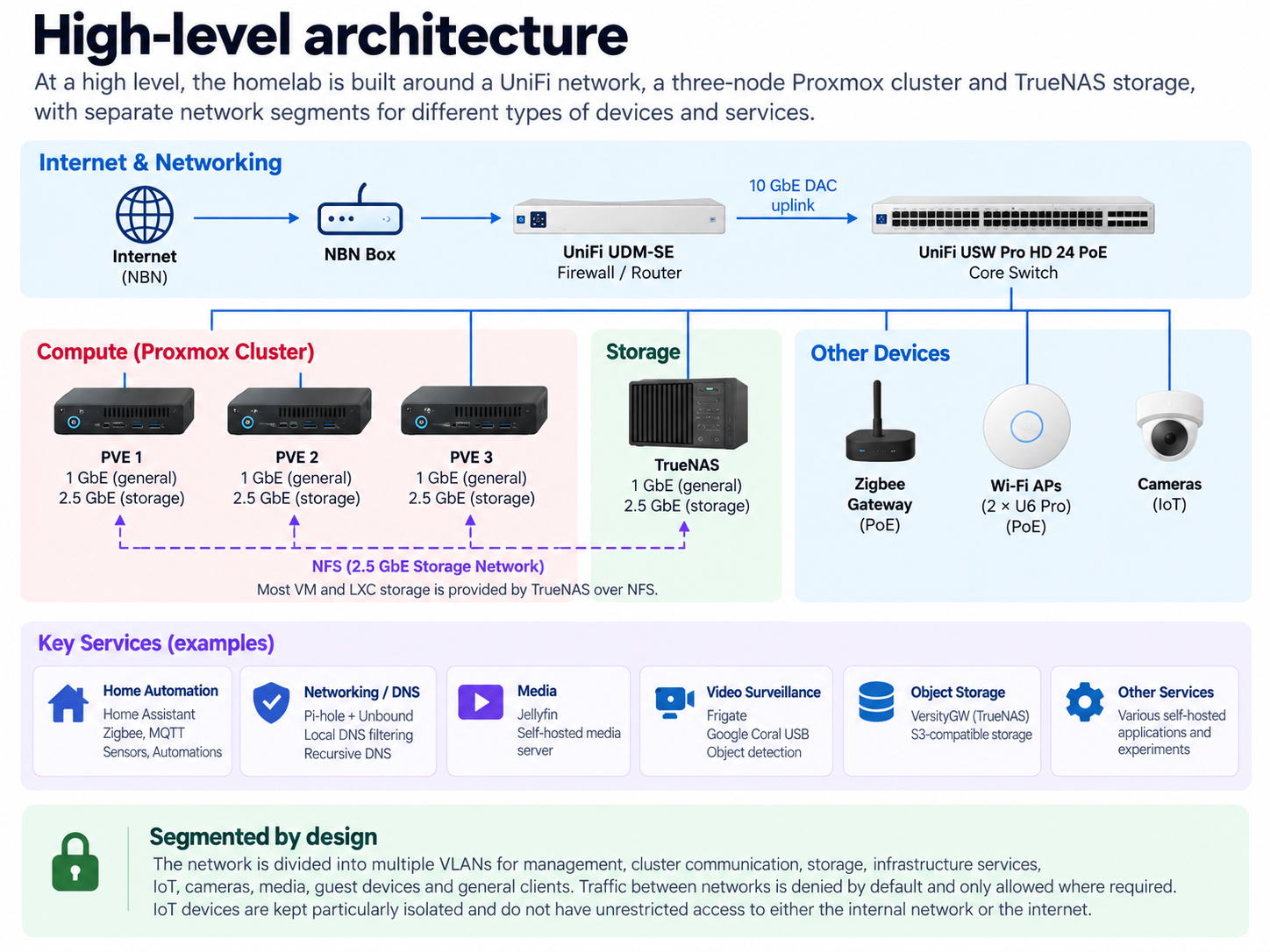
The NBN NTD hands off to the UDM-SE, which connects to the main switch over a 10 GbE DAC uplink.
From there, the switch connects the Proxmox cluster, TrueNAS, wireless access points, Zigbee infrastructure, cameras and other devices around the house.
The high-level physical path is:
NBN → UDM-SE → 10 GbE DAC → USW Pro HD 24 PoE → lab devices
I prefer this design because the switch remains the centre of the local infrastructure while the UDM-SE handles routing, firewalling and the network boundaries around it.
Three identical Proxmox nodes
The main compute layer consists of three identical HP EliteDesk 800 G4 Mini 35W systems running Proxmox VE.
Each node has:
- Intel Core i7-8700T
- 6 cores / 12 threads
- 64 GB RAM
- 2 × 500 GB NVMe SSDs
- mirrored ZFS Proxmox boot pool
- 1 GbE onboard networking
- a separate 2.5 GbE interface
Across the three nodes, that gives the cluster 18 physical cores, 36 threads and 192 GB of RAM. 64 GB per node is double what HP officially supports on these machines, but two 32 GB SODIMMs work without complaint.
I deliberately chose small business desktops rather than traditional rack servers.
Three is also the smallest number that gives the cluster a real quorum. A single node can fail, or be rebooted for maintenance, without the remaining two losing the ability to make decisions on their own.
For a home environment they provide a useful amount of compute and memory while remaining compact, quiet and relatively power efficient.
The EliteDesk Minis were not designed around the network layout I wanted, and adding that second 2.5 GbE interface took more than dropping in a PCIe card — enough for its own post.
Separating normal traffic from storage traffic
Each Proxmox node has two network paths.
The onboard 1 GbE interface handles normal host and workload connectivity.
A separate 2.5 GbE interface is used for storage traffic.
TrueNAS follows the same pattern, with both normal network connectivity and a dedicated 2.5 GbE storage connection.
The physical interfaces terminate on the same UniFi switch, while VLANs provide the logical separation between the different types of traffic.
Most VM and LXC storage is hosted on TrueNAS over NFS, so separating storage traffic from ordinary client traffic made sense as the lab grew.
TrueNAS as the shared storage layer
The storage server is a Lenovo ThinkCentre M83 SFF running TrueNAS.
It currently has:
- Intel Core i7-4790
- 32 GB RAM
- 2 × 500 GB SSDs in a mirrored boot configuration
- 2 × 12 TB Seagate IronWolf Pro disks in a mirrored storage pool, mounted in a dock in the old optical bay
- an LSI-based HBA running in IT mode
- 1 GbE onboard networking
- a separate 2.5 GbE interface for storage traffic
A stock M83 has nowhere to put two 3.5" drives, so this one is modified. The optical drive came out and an Olmaster dual-bay dock (2.5" and 3.5") went into the vacated 5.25" bay, and the two IronWolf Pro disks live in there.
TrueNAS primarily provides NFS storage to the Proxmox environment.
Most of my virtual machines and containers use NFS-backed storage rather than keeping all of their data tied to an individual Proxmox host.
There are still situations where local storage makes sense, but shared NFS is the normal path.
TrueNAS also provides S3-compatible object storage through VersityGW, which runs as a TrueNAS application.
That has been particularly useful for applications and experiments that expect an S3-style object-storage interface rather than a traditional filesystem.
The network is segmented by design
One thing I did not want was a single flat home network where every device could communicate freely with everything else.
The network is divided into separate VLANs based on purpose, including segments for:
- management
- Proxmox cluster communication
- storage
- infrastructure services
- IoT
- cameras
- general devices
- media
- guest devices
- reverse-proxy services
- private services
The exact VLAN IDs and addressing are not particularly important to the design.
The important part is that communication between networks is denied by default and then selectively allowed where required.
I especially apply this to IoT devices.
There are a large number of connected devices around the house: motion sensors, temperature sensors, contact sensors and other automation devices.
Those devices do not need broad access to the rest of the environment, and many of them do not need unrestricted internet access either.
So rather than treating every device in the house as equally trusted, each category gets access only to what it actually needs.
Pi-hole and Unbound for DNS
DNS is one of the small pieces of infrastructure that almost everything else depends on.
I run Pi-hole together with Unbound.
Pi-hole provides local filtering and DNS control, while Unbound provides recursive DNS resolution.
They sit in the infrastructure-services network rather than being mixed in with general application workloads.
DNS is one of those services that tends to disappear into the background when everything is working correctly, but the moment it fails, a surprising amount of the environment stops behaving normally.
For that reason I treat it as infrastructure rather than simply another self-hosted application.
Home automation is still at the centre of it
Even though the lab now runs much more than Home Assistant, home automation is still what caused all of this to exist.
Home Assistant, Zigbee and MQTT form the core of the automation environment.
There are many devices around the house providing information such as:
- motion
- temperature
- doors and windows
- presence
- device states
- other environmental conditions
Those devices feed automations that run locally rather than depending entirely on external cloud services.
That also explains why the IoT network is one of the areas I isolate most aggressively.
Once dozens of small devices are connected throughout a house, separating them from management interfaces, storage systems and trusted client devices becomes much more important.
Cameras, Frigate and Coral
Video surveillance is another workload running in the lab.
I use Frigate for camera processing and local object detection.
Frigate is paired with a Google Coral USB accelerator, which handles the machine-learning inference required for object detection without pushing all of that work onto the Proxmox CPUs.
The cameras themselves live on a separate network.
The general idea is that infrastructure should be able to consume video from them without the cameras automatically receiving unrestricted access to the rest of the environment.
Media services
The lab also hosts my self-managed media environment.
Jellyfin is the visible part of that setup and provides the media-server interface.
There is considerably more behind it, including media-management and download automation, but I am intentionally leaving that out of this overview.
Why I run this myself
A lot of these services could be replaced by cloud products or SaaS subscriptions, and for some workloads that would probably be easier. But convenience is not the only reason I run this environment.
Running infrastructure yourself forces you to deal with the parts that are easy to ignore when somebody else operates the platform:
- Where does state live?
- What happens when a host fails?
- How should networks communicate?
- What needs internet access, and what should be isolated?
- Where should storage live?
- How do upgrades affect dependencies?
- What happens when DNS disappears?
- How do you recover something after breaking it?
Operating the environment over time has taught me far more than installing each application once ever did. And because this is my own lab, I can change something, break it, rebuild it, and understand why it behaved the way it did.
What the homelab has become
A single automation box on a shelf has turned into a small infrastructure environment built around:
UniFi networking → Proxmox compute → TrueNAS shared storage → self-hosted services.
It supports home automation, networking services, video surveillance, media workloads, storage, object storage and whatever I happen to be experimenting with next.
More importantly, it gives me somewhere to build things properly rather than just reading about them.
A lot of what I write about on this site will come from somewhere inside this rack.
What I'll cover next
There is far too much here to explain properly in one post.
Some of the areas I plan to go deeper into include:
- adding 2.5 GbE to the HP EliteDesk 800 G4 Mini
- how I built the three-node Proxmox cluster
- TrueNAS and NFS storage for Proxmox
- how I segment the network with UniFi VLANs
- Pi-hole and Unbound
- Home Assistant, Zigbee and MQTT
- Frigate with Google Coral
- my self-hosted media stack
- S3-compatible storage with VersityGW
This post is the map.
The next ones can explore the individual parts.
Everything mentioned here
The projects that make up the lab, in the order they appear above.
- Home Assistant — home automation, Zigbee and MQTT
- Proxmox VE — virtualisation and clustering
- TrueNAS — shared storage
- VersityGW — S3-compatible object storage on TrueNAS
- Pi-hole — local DNS filtering
- Unbound — recursive DNS resolution
- Frigate — camera NVR with local object detection
- Google Coral USB Accelerator — the inference hardware behind Frigate
- Jellyfin — self-hosted media server